
Gift card refunds
Summary
This page explains how the ReBound-Shopify integration can issue refunds as gift cards, providing a flexible alternative to store credit refunds and allowing customers to redeem their refund without needing a Shopify account.
How it works
- When a return meets your configured refund milestone, the ReBound integration triggers a gift card refund in Shopify. Learn more about refund milestones.
- The returned (expected/received) items are marked as "returned" in the Shopify order. This is done through Shopify's returnProcess mutation.
- The refund value (including any configured bonus) is then issued as a Shopify gift card. This is done using Shopify's giftCardCreate mutation.
- An email is automatically sent to the customer (by Shopify), containing the gift card code and value. The gift card can be redeemed at checkout without a buyer account.
- If the refund cannot be processed automatically (e.g., due to unsupported payment methods, multiple transactions, or technical issues), you will receive an email notification to manually process the refund in Shopify. Learn more about manual processing.
Note: Gift card refunds can include a bonus percentage, if configured. This bonus is only applied to store credit or gift card refunds, not to refunds to the original payment method.
Gift Card vs Store Credit: Comparison
| Feature | Store Credit 💸 | Gift Card 🎁 |
|---|---|---|
| Requires buyer account/login | Yes | No |
| How to redeem | At checkout by logging in and choosing store credit (as payment method) | At checkout by entering the gift card code |
| Who can redeem | Only the customer the credit was assigned to | Anyone |
| Stacks across refunds | Yes. Store credit can be collected from multiple refunds and used all at once at checkout | No. Gift cards must be used separately (max one per order) |
| Can it be shared with other people? | No | Yes, gift card can be shared |
| Can it be used multiple times? | No, the amount is used up from the buyer’s account and can only be used once | No, the gift card has its own balance. Once used, it’s no longer valid |
| Can an expiration date be set? | Yes (no expiration by default) | Yes (no expiration by default) |
| API logic | Use returnProcess mutation to process return line items and issue store credit refund | Use returnProcess mutation to process return line items (refund of 0), then giftCardCreate mutation to issue a gift card and send to customer’s email |
Setting it up
Gift card refunds must first be enabled in ReBound by your Implementation Manager before they can be configured in the Shopify integration app. Please make sure gift card refunds are enabled for your account first.
-
Open the "ReBound Returns" app in your Shopify store.
-
Go to the "Integration Settings" page.
-
Scroll down to the "Refund settings" section.
-
Ensure the "Issue refunds in Shopify" feature is turned on and an email address is configured in the "Contact email for failed refunds" section. Learn more.
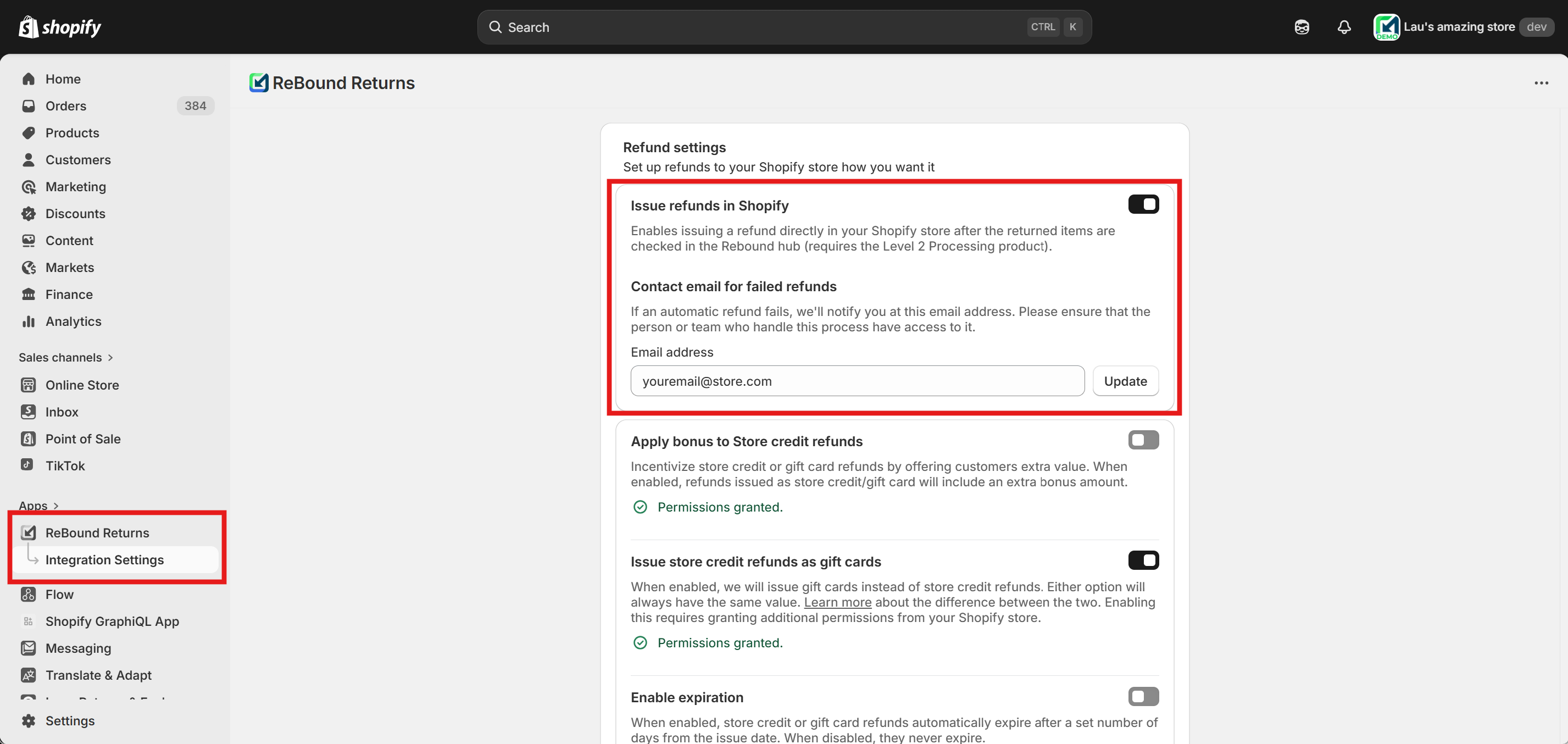
Enabling refunds and configuring the notification email address.
-
Enable the "Issue store credit refunds as gift cards" feature using the toggle. You will be prompted to approve additional app permissions for gift card management. Approval is required to enable this feature.
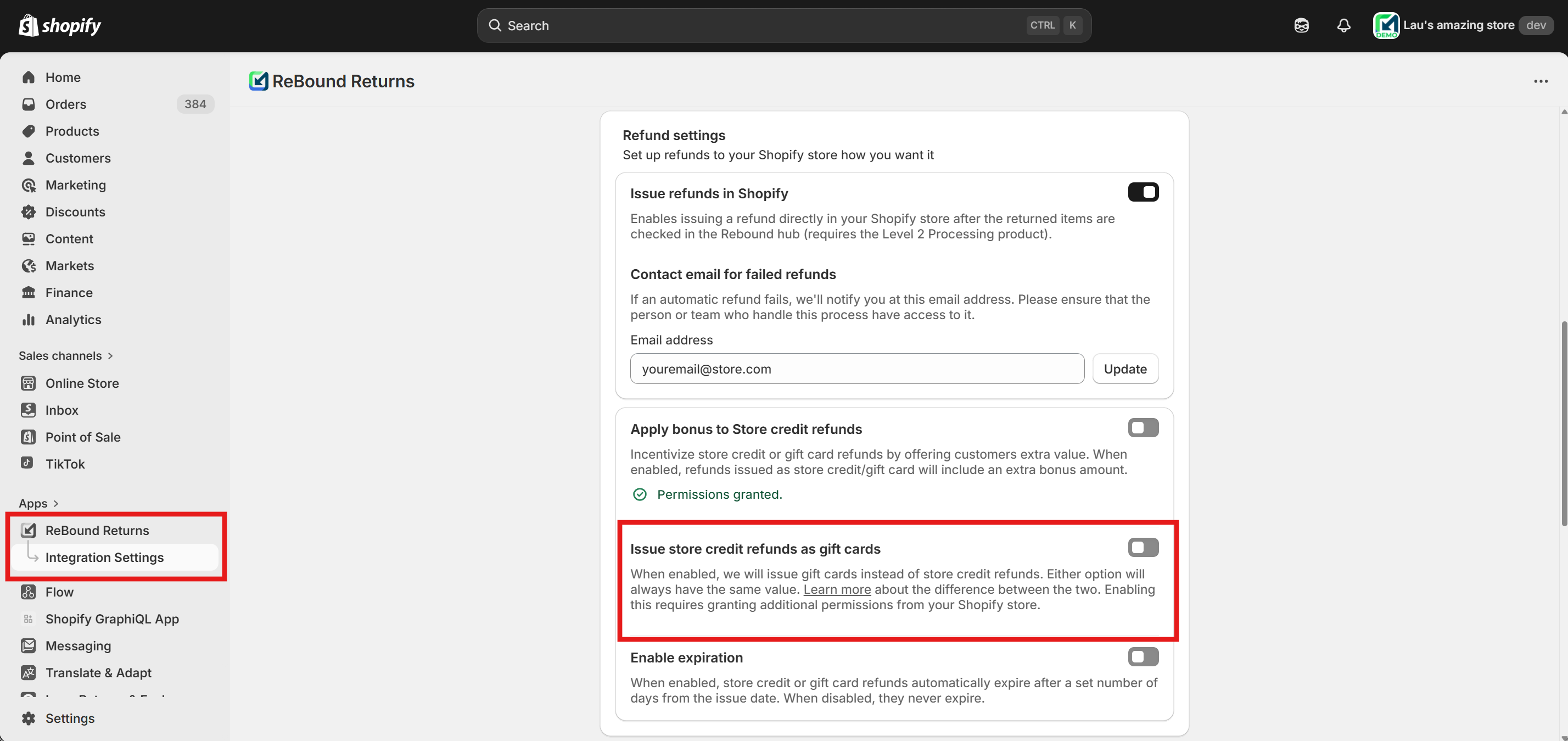
Enabling the gift card feature.
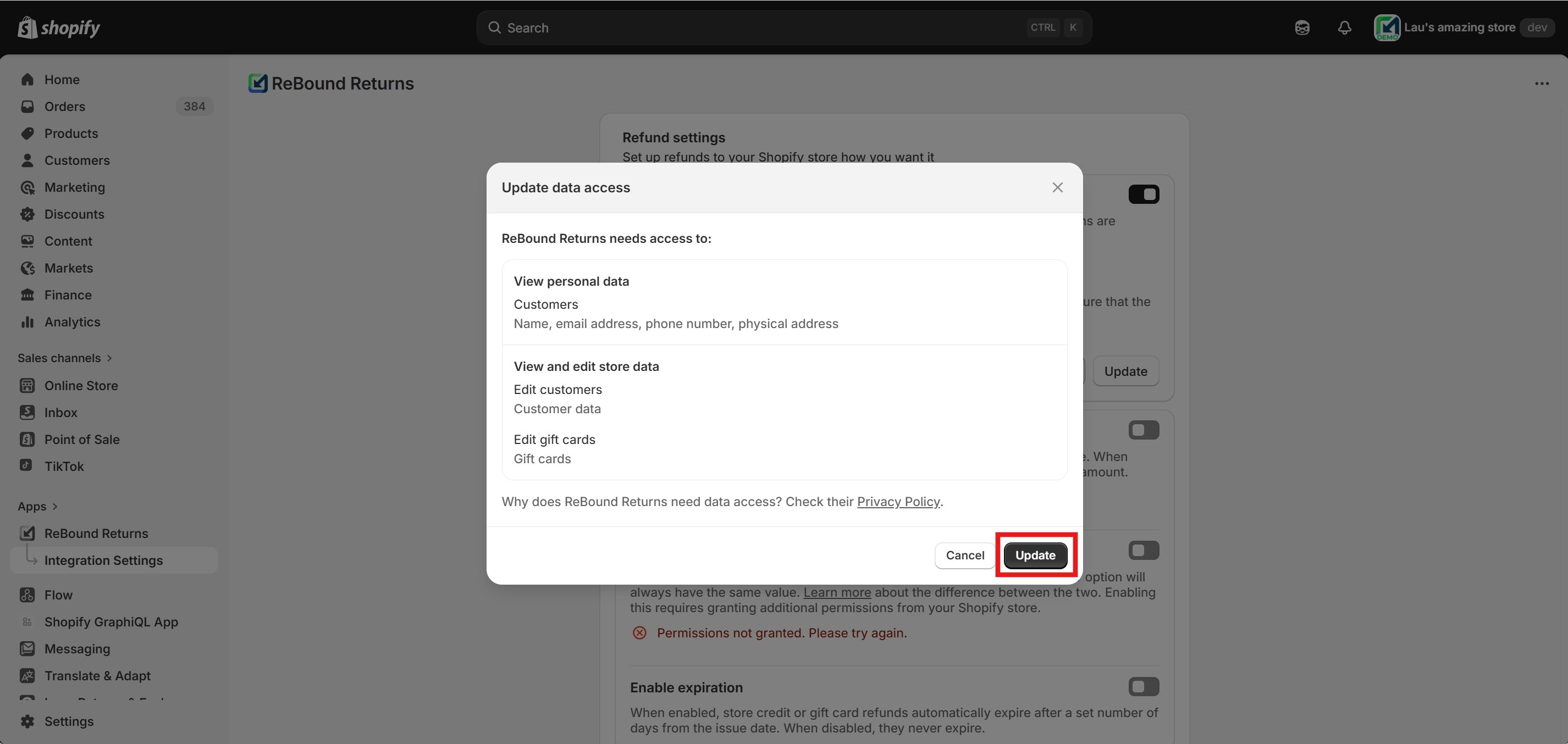
Approving the required permissions for gift card refunds.
-
(Optional) Configure bonus gift card refunds:
-
Turn on the feature using the toggle to the right of "Apply bonus to Store credit refunds".
-
Enter the desired bonus percentage and press "Save" or "Update". The "%" character is not required.
-
(Optional) Enable rounding up to round refund values to the nearest full unit. This calculation is done per item.
-
Example: An item worth $38.30 with a 10% ($3.83) bonus would result in a refund of $42.13; this would be rounded up to $43.
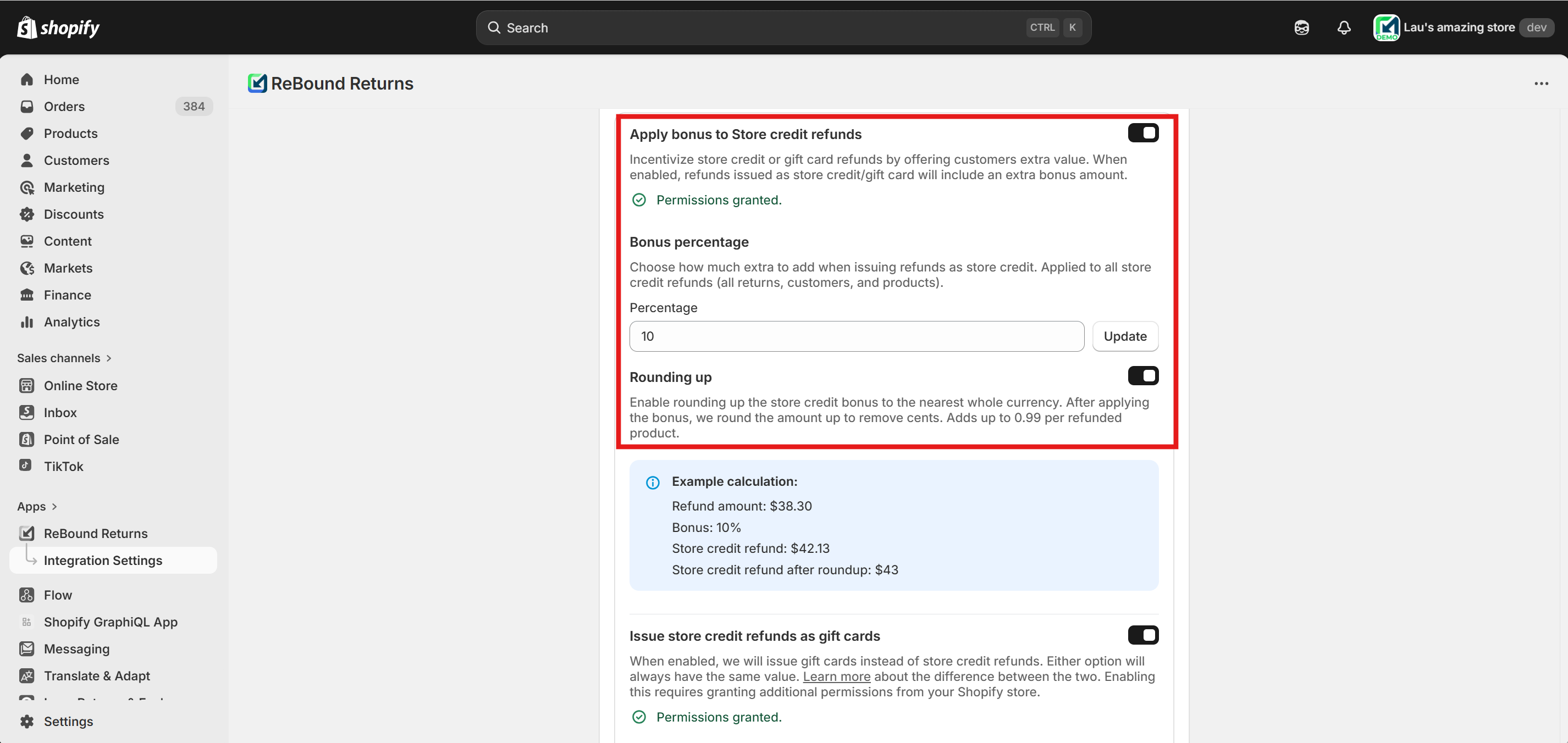
Enabling and configuring gift card bonus value.
-
-
(Optional) Enable gift card expiration:
-
Turn on the feature using the toggle to the right of "Enable expiration".
-
Enter the number of days the gift card should be valid for. The expiration date is calculated from the day the gift card is issued.
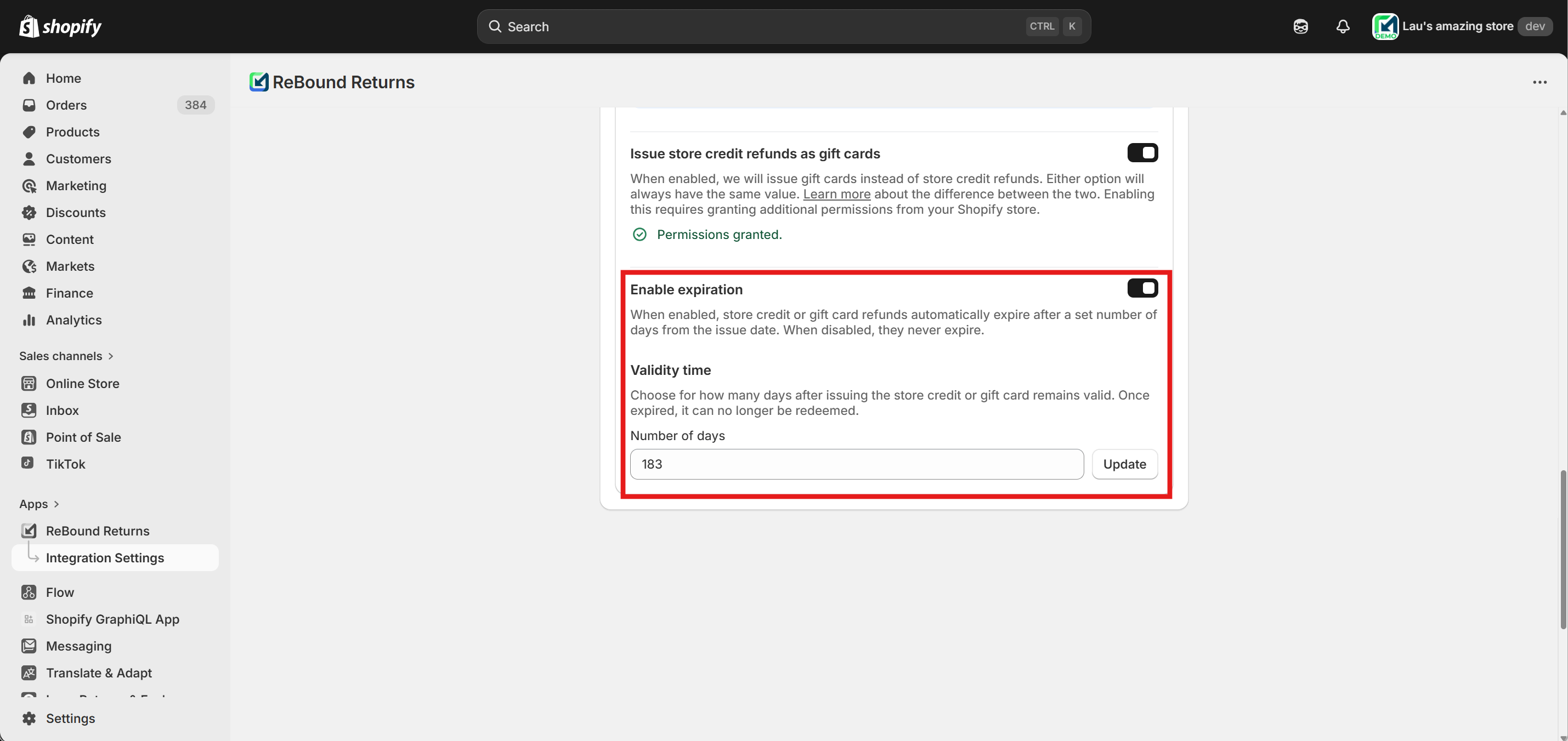
Enabling and configuring gift card expiration.
-
Frequently Asked Questions
Q: Can I issue both store credit and gift card refunds at the same time?
A: No, only one of the two functionalities can be active at a time. They both have the same value (including bonus) and expiration date (if configured). Depending on which is enabled, all store credit refunds will be issued as store credit in the customer's account or as a gift card.
Q: How does the gift card refund work for customers without a Shopify account?
A: The customer receives a gift card code by email, which can be redeemed at checkout without needing to create or log in to a Shopify account.
Q: Can I offer a bonus for gift card refunds?
A: Yes, you can configure a bonus percentage in the Shopify app. This bonus is added to the gift card refund value and is only applied to store credit or gift card refunds, not to refunds to the original payment method.
Q: What happens if a gift card refund cannot be processed automatically?
A: You will receive an email notification at the address configured in the app. You must then process the refund manually in Shopify. Learn more about email notifications and manual processing.
Q: Are shipping fees or duties refunded automatically with gift card refunds?
A: Gift card value is the same as store credit refund value. Check out the store credit refunds FAQ section.
Q: Are taxes refunded automatically with gift card refunds?
A: Gift card value is the same as store credit refund value. Check out the store credit refunds FAQ section.
Updated 8 months ago
What’s Next
Learn about other possible refund outcomes and how to configure them: