
Issuing refunds in Shopify
Summary
When returns are processed in the ReBound hub, our integration can automatically refund them into Shopify.
That releases the refund or exchange item to the customer immediately.
If any refund that can't be issued automatically (due to an error or an integration limitation), we'll send you an automated email notification for manual processing.
When to use this
- If you want quick refunds for an improved customer experience, we can issue them on return drop-off or receipt in our hub.
- If you want more accurate refunds (only refund products that customers actually returned or which are in good shape), we can refund them on return processing in our hub, after returned items are checked.
- If you want to issue refunds as store credit or gift cards (instead of back to the original payment method). This helps retain value from a return and create an opportunity for an upsale.
- If you want customers to seamlessly request an exchange for a different product variant (e.g., smaller size or different color), the exchange can be released instead of a regular refund.
How it works
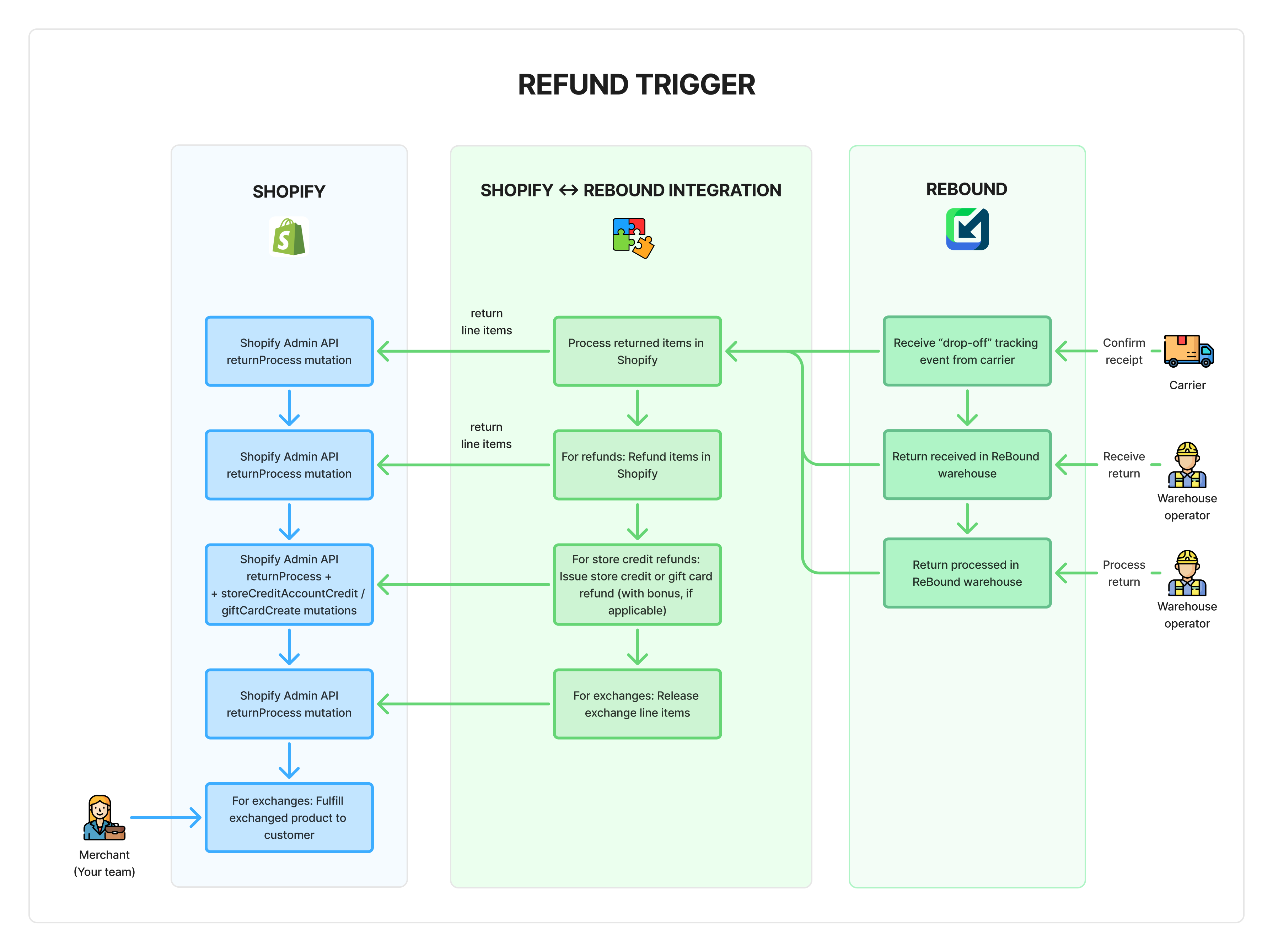
It is possible to trigger a refund using different events in our network: (1) return receipt by carrier, (2) return receipt by ReBound warehouse or (3) return processed by ReBound warehouse.
The first two options do not include checking the actual content of a return, merely that we or the carrier received it. This can enable a fast refund, but more limited fraud protection.
The third option includes checking the return content in our warehouse. In that case, only the items that were received and met pre-approved quality criteria (e.g., not worn/used) will be refunded.
- Refund trigger event happens in ReBound network.
- Returned items are processed in Shopify using the returnProcess mutation. This sets them to "Refunded" in the Shopify admin.
- Refunds to original payment method are issued using the returnProcess mutation. This releases the money back to the customer's account.
- Store credit refunds are issued using the returnProcess mutation. Any bonus is issued separately using the storeCreditAccountCredit mutation. This credits the customer's store credit account immediately.
- Gift card refunds are issued using the giftCardCreate mutation. This generates the gift card code immediately, and sends it to the customer's email automatically (in a Shopify-issued email).
- Exchanges are released using the returnProcess mutation. This creates a new fulfillment order in "OPEN" status that you or your fulfillment services provider can then process.
Setting it up
The refund trigger itself must first be enabled in your ReBound account by your implementation manager. Please reach out to them if you wish to enable/disable this feature.
Once enabled, you must enable refunds and configure an email address for error notifications. Learn how to do that.
Updated 6 months ago
What’s Next
Learn more about specific refunding functionalities and configuration options.