
Testing the integration (test and live modes)
Summary
Our integration has two modes: Test and Live.
You can choose which mode to enable when installing the app.
If you wish to change the mode, please uninstall the app, install it again and select the other mode.
Test vs Live modes comparison
When installing the ReBound-Shopify integration, you can choose between "Test" and "Live" modes. This allows you to configure which ReBound API environment the integration should work with.
| Test mode 🔧 | Live mode 🚀 | |
|---|---|---|
| When to use | You are on a development/test store. You are still testing the end-to-end flow. You are still getting familiar with the app. | You are on a live/production store. You've confirmed with ReBound you're ready to go. You have tested everything. |
| ReBound environment | Pre-production | Production |
| ReBound consumer portal (if enabled) | {yourstore}.pre.myreturnsportal.com/ | {yourstore}.myreturnsportal.com/ |
| ReBound CS portal (if enabled) | customer-service.pre.reboundplatform.com | customer-service.reboundplatform.com |
How to set it up
You can simply tick one of the boxes during the app's installation:
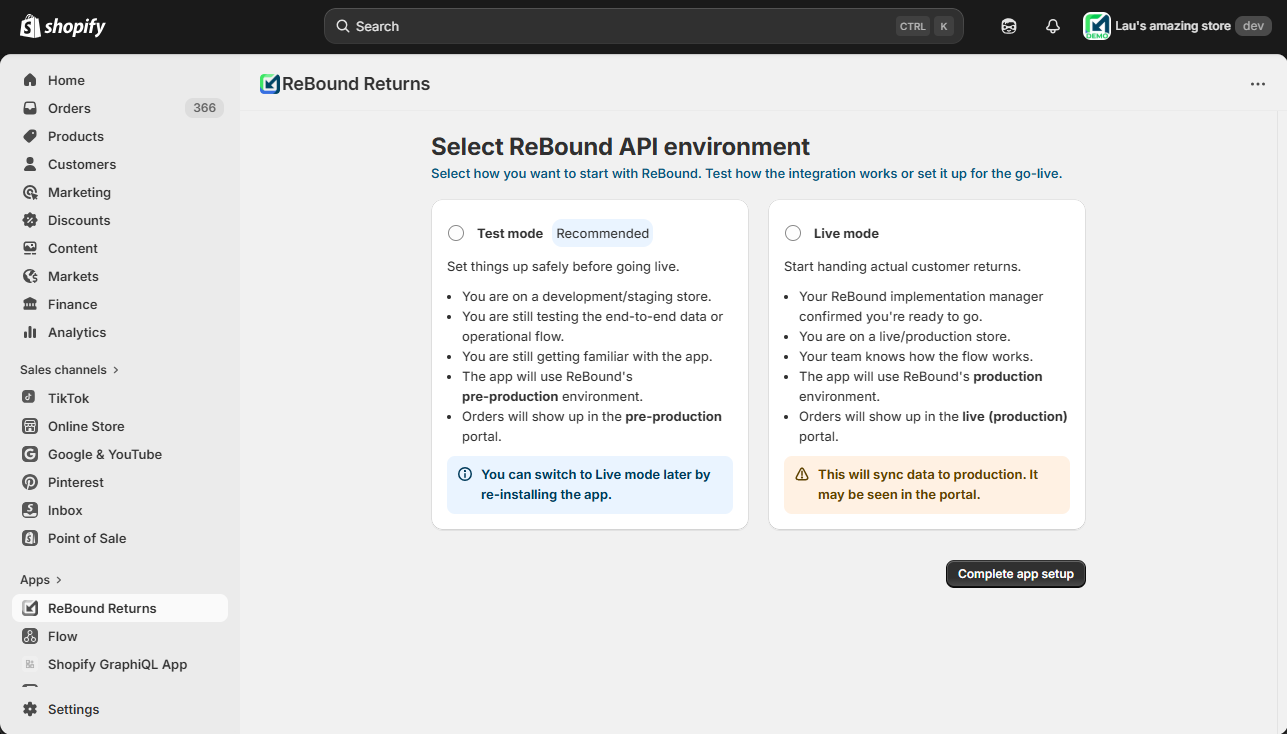
How to change the app mode
Once the integration is set up in either Test or Live mode, the setting can't be changed.
You can always uninstall the app from your Shopify store and install it again. When you install the app again, you are able to select a different environment.
Updated 7 months ago
Did this page help you?