
Store credit refunds
Summary
This page explains how the ReBound-Shopify integration issues store credit refunds to the customer’s Shopify account, providing a flexible alternative to refunds to the original payment method and enabling merchants to retain more value from returns.
How it works
- When a return meets your configured refund milestone, the ReBound integration triggers a store credit refund in Shopify. Learn more about refund milestones.
- The returned (expected/received) items are marked as "returned" and the store credit refund is issued automatically to the customer’s Shopify account. This is done through Shopify's returnProcess mutation.
- If you are offering a bonus to store credit refunds (a higher amount than the customer initially paid), the bonus part of the refund is issued through Shopify's storeCreditAccountCredit mutation. This looks like a "different transaction" in to the customer and to you.
- Only items registered by the customer for return (“expected items”) are eligible for automatic store credit refund.
- Store credit can only be redeemed if customers have an account on your website. If they do not, store credit is still issued to their Shopify account, but they will be required to create/activate one to redeem it at checkout. Alternatively, gift cards can be issued instead of store credit. Learn more about gift card refunds.
- If the refund cannot be processed automatically (e.g., due to unsupported payment methods, multiple transactions, or technical issues), you will receive an email notification to manually process the refund in Shopify. Learn more about manual processing.
Note: Store credit refunds can include a bonus percentage, if configured. This bonus is only applied to store credit or gift card refunds, not to refunds to the original payment method.
Setting it up
Store credit refunds must first be enabled in ReBound by your Implementation Manager before they can be configured in the Shopify integration app. Please make sure store credit refunds are enabled for your account first.
-
Open the "ReBound Returns" app in your Shopify store.
-
Go to the "Integration Settings" page.
-
Scroll down to the "Refund settings" section.
-
Ensure the "Issue refunds in Shopify" feature is turned on and an email address is configured in the "Contact email for failed refunds" section. Learn more.
-
If desired, enable and configure bonus store credit refunds:
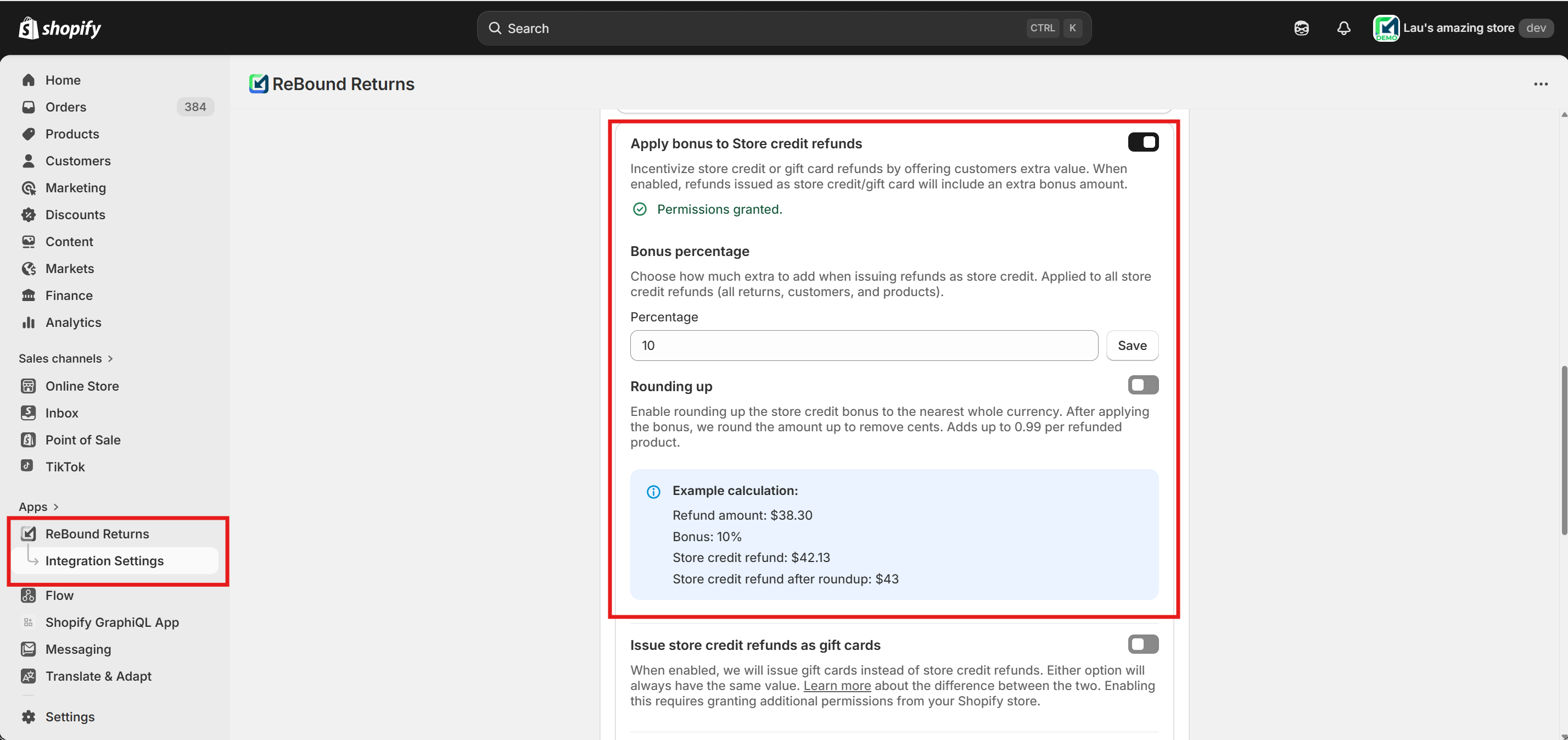
- Turn on the feature using the toggle to the right of "Apply bonus to Store credit refunds". A screen will open requesting additional app permissions. Approval is required to enable this feature.
- Configure the desired bonus percentage in its respective section, by filling in a number and pressing "Save" or "Update". The "%" character is not required.
- If desired, enable rounding up. This will round up refund values to the nearest full unit. For example, an item worth $38,30 with a 10% ($3,83) bonus would result in a refund of $42,13; this would be rounded up to $43. This calculation is done per item.
-
If desired, enable store credit expiration:
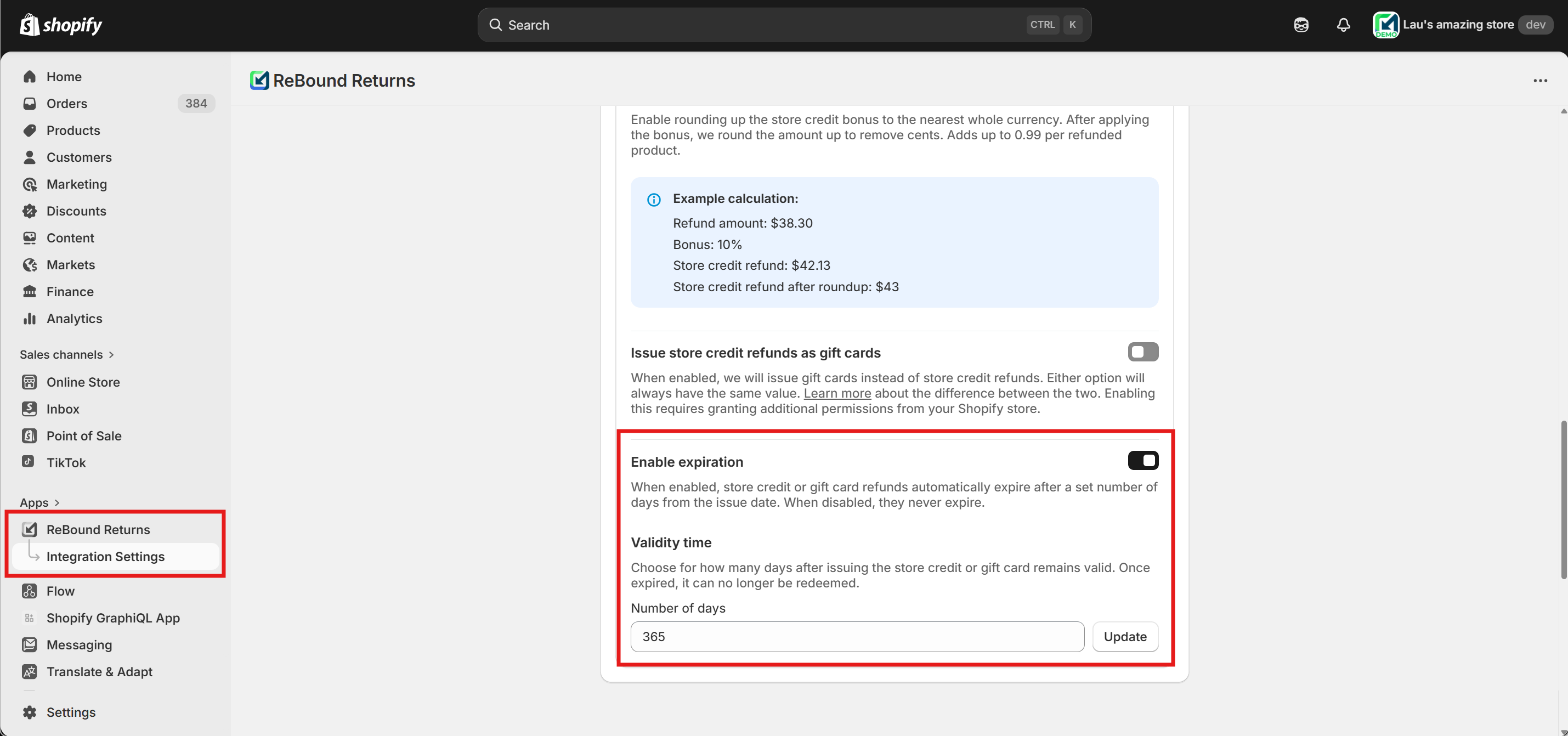
- Turn on the feature using the toggle to the right of "Enable expiration".
- Insert a number of days store credit should be valid for. The expiration date is calculated on the day the credit is issued by adding this amount of days. For example, if the refund is issued on 9 Mar with 30 days validity, the expiration date will be 8 Apr.
Frequently Asked Questions
Q: How does the store credit refund work for customers without a Shopify account?
A: If the customer does not have a Shopify account, they must first create/activate one to redeem it at checkout. Alternatively, gift cards can be issued instead of store credit. Learn more about gift card refunds.
Q: Can I offer a bonus for store credit refunds?
A: Yes, you can configure a bonus percentage in the Shopify app. This bonus is added to the store credit or gift card refund value and is only applied to these refund types, not to refunds to the original payment method.
Q: What happens if a store credit refund cannot be processed automatically?
A: You will receive an email notification at the address configured in the app. You must then process the refund manually in Shopify. Learn more about email notifications and manual processing.
Q: Are shipping fees or duties refunded automatically?
A: By default, only the product value is refunded. Shipping fees and duties are not refunded.
Q: Are taxes refunded automatically?
A: Depending on the customer's address and legal requirements for your business in the region, taxes may be applied differently to the products.
For example, in most EU countries, VAT is collected as part of the product price (e.g., a €50 item already includes the 21% VAT), while in most US states, sales tax is added on top (e.g., a $10 tax on a $50 item, resulting in a total payment of $60 for that item).
Our integration automatically refunds taxes associated with the individual line item. If they were included in the item's price (e.g., EU VAT), only the item's price is refunded. If they were not included (e.g., US sales tax), the tax amount is refunded in addition to the item's price.
Any bonus is applied on top of the refund inclusive of taxes. In the examples above, the bonus would be added on the €50 or $60 refund value.
Updated 8 months ago
What’s Next
Learn about other possible refund outcomes and how to configure them: